
Includes, also known as partials on platformOS, are Liquid files which are smaller than a Page or Page Template, but which are intended to be included more than once in a Site.
Using includes can have the following benefits:
It allows you to use code from other sources, for example, from a Siteglide Module
It allows you to save time writing code- where the code should be the same or similar in two places, you can include the same include in both places, using Liquid logic to achieve small differences based on contextual variables.
It allows you to save time maintaining code- as bug fixes can be handled in one place
It keeps your code tidy, as you are able to abstract a particular function into one place
Types of Include
Content Sections and Code Snippets
A kind of include which is easy for clients and agencies alike to access from the Siteglide Admin, if their user roles allow.
The only difference between Content Sections and Code Snippets is organisational: they are functionally the same, but generally Content Sections will contain functional front-end HTML, whereas Code Snippets are more likely to contain invisible <head> metadata or JavaScript code. This is not a rule, and it's up to agencies how they use them.
Headers and Footers
A kind of include which is easy for clients and agencies alike to access from the Siteglide Admin, if their user roles allow.
Headers and Footers are intended a an optional place to store code which forms the visible header (or footer). It isn't the same thing as using our Menu Builder Module to include a 'menu' feature, though often it will contain this as it's main feature. You can choose to skip this and place header code straight in the Page Template.
WebApps, Modules and More Includes From Siteglide
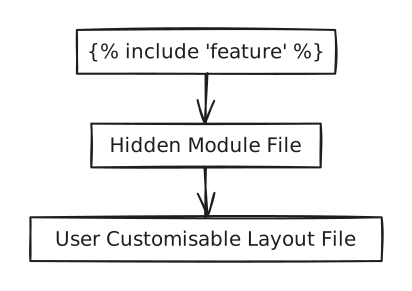
Throughout our documentation, we'll give you the code to add a feature to your site and it will contain an include tag. Usually this will include a hidden Liquid file from the Siteglide module which controls key functionality and fetches important data, which will then in turn include the layout file which you can customise yourself.
Check out the rest of this topic for more special Siteglide Liquid includes.
Custom Path
You can write your own Liquid partial files and include them anywhere. See:
{% content-ref url="../../miscellaneous-siteglide-includes/includes-with-siteglide-cli.md" %} includes-with-siteglide-cli.md {% endcontent-ref %}